Course Syllabus
Syllabus:
Topic 1: Fundamentals of Artificial Intelligence
- 1.1 Introduction to Artificial Intelligence
- Understanding Artificial Intelligence
- Definition of AI with real-life examples (Google Search, YouTube Recommendations, UPI fraud detection)
- Concept of Intelligence (learning, reasoning, decision-making)
- Difference between automation and AI
- AI vs Traditional Computer Programs
- How machines simulate intelligent behavior
- Human Intelligence vs Machine Intelligence
- Learning from experience (Human learning vs Machine learning from data)
- Decision making using data patterns
- Limitations: Emotions, empathy, ethical judgement
- Evolution and Growth of AI
- Early computing to modern AI systems
- Role of Big Data, Cloud Computing (Google Cloud, Microsoft Azure basics)
- AI in today’s digital ecosystem
- Growth of AI in India (Digital India, AI in public services)
- 1.2 Core Concepts of AI (Basic and Conceptual)
- Data as the Foundation of AI
- Structured and unstructured data
- Data collection and digital footprints
- Importance of data quality
- Types of data: Text, Images, Audio, Video
- Data sources: Social media, banking apps, e-governance portals
- Concept of training data (simple explanation with example: spam detection)
- Introduction to Machine Learning
- What is Machine Learning? (Learning from examples)
- Example: Email spam filter, Netflix recommendations, Amazon suggestions
- Supervised vs Unsupervised learning (basic conceptual difference)
- AI, Machine Learning and Deep Learning
- AI as umbrella concept
- ML as subset
- Deep Learning and Neural Networks (Face recognition, Voice recognition – conceptual only)
- 1.3 AI in Everyday Digital Services
- AI in Smartphones
- Google Assistant / Siri (voice commands)
- Face Unlock and Fingerprint recognition
- Google Photos automatic categorization
- AI in Social Media and Online Platforms
- Instagram / Facebook feed recommendations
- YouTube video suggestions
- AI content moderation (removal of harmful posts)
- AI in Banking and Governance
- Fraud detection systems
- AI chatbots in public services
- AI-enabled e-governance platforms
- 1.4 Benefit and Limitation of AI
- Advantages of AI
- Automation and efficiency
- Accuracy and speed
- 24/7 availability
- Limitations of AI
- Lack of human judgment and emotions
- Bias in data and algorithms
- Over-dependence on technology
- Human-AI Collaboration
- AI as an assistive tool
- Enhancing productivity
- Responsible usage
- 1.5 AI Risks, Ethics and Safety
- AI-based Digital Threats
- Deepfake videos (basic awareness)
- AI-generated fake messages
- Voice cloning scams
- Data Privacy and Protection
- Safe sharing of Aadhaar, PAN, bank details
- Importance of strong passwords and OTP security
- Recognizing suspicious AI-generated content
- New Govt laws on AI Generated Content
- Responsible Use of AI
- Verifying AI-generated information
- Avoiding blind trust in AI outputs
- Understanding bias in AI systems
- 1.6 Future Skills in the AI Era
- Digital Literacy with AI Awareness
- Understanding how AI influences search results
- Identifying AI-generated images and videos
- Responsible social media behaviour
- Data Intelligence and Critical Thinking
- Reading charts and digital reports
- Cross-verifying online information
- Logical questioning of AI responses
- Tech-Friendly and Adaptive Behaviour
- Continuous learning mindset
- Using AI tools ethically
- Preparing for AI-enabled workplaces
Topic 2: Introduction to Generative AI Tools & Prompting
- 2.1 Overview of AI Tools
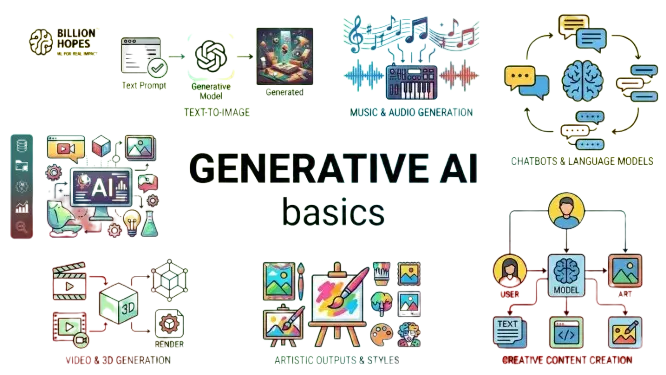
- Overview of Generative AI
- Introduction to Generative AI
- How Generative AI is Different from Traditional AI
- Types of Content Generated by Generative AI
- How Generative AI Works (Basic Conceptual Level)
- Categories of AI Tools
- Conversational AI
- Content generation tools
- Productivity-enhancing AI tools
- Text-Based AI Tools
- ChatGPT (basic text generation and Q&A)
- Google Gemini
- Perplexity
- Bing Chat (Chat + web-based answers)
- Smodin/TextCortex (Writing assistance & summarizing)
- Microsoft Copilot
- NoteLLM
- AI Tools for Images and Creativity
- Canva AI (Magic Design, Text-to-Image basics) for Posters
- Google Gemini Image generation
- Adobe Express Designer (Templates + easy AI enhancements)
- Remove.bg (Background Removal)
- Freepic
- Playground AI (Text-to-image generation)
- DALL·E / Dream / Playground (AI Art Prompting)
- Pixlr / Photopea (AI filters & Photo Editing)
- Audio and Translation tools
- Google Recorder (Dictation & notes) - Record and auto-transcribe lectures
- Otter.ai (Get auto summaries of group talks)
- ElevenLabs (Generate natural voiceovers)
- DeepL (Translate paragraphs fluently)
- Microsoft Translator (Converse across languages)
- AI Tools in Productivity Software
- MS Word Copilot (auto content suggestions – concept)
- Google Docs Smart Compose
- Grammarly (AI writing assistant)
- Zoho Writer AI (Writing enhancement and summarization)
- Notion AI (Text generation & organization)
- Trello AI (Butler) - Task/automation suggestions
- Safe and Responsible Usage
- Using official platforms
- Account safety and passwords
- Understanding privacy policies
- 2.2 Understanding Prompts
- What is a Prompt?
- Giving instructions to AI
- Asking clear and specific questions
- Providing context and Purpose
- Elements of a Good Prompt
- Role (Act as a teacher)
- Task (Write an application)
- Output format (In 150 words)
- Language preference (Hindi / English)
- Adding necessary details
- Specifying output format
- Step-by-Step Guidance from AI
- Asking AI for structured notes
- Generating outline before full content
- Creating bullet-point summaries
- Practice-Based Prompting Examples
- Writing a leave application
- Preparing a resume summary
- Creating an event notice
- Explaining a school topic in simple language
- 2.3 Responsible and Ethical Use of AI Tools
- Verifying AI-Generated Content
- Cross-checking facts
- Identifying misinformation
- Avoiding Misuse
- Preventing plagiarism
- Respecting copyright and originality
- No sharing of personal data
- Ethical academic usage
- 2.4 Practical Applications for Citizens
- Office and Administrative Use
- Drafting emails
- Preparing circulars and notices
- Creating basic reports
- Note-making
- Presentation outlines
- Academic and Learning Use
- Concept clarification
- Exam preparation support
- Making presentation outlines
- Job and Career Support
- Resume drafting
- Interview question preparation
- Cover letter generation

 Bestseller